What Is Prompt Engineering and How Should You Use It?
Stop fighting with ChatGPT. Learn the real prompt engineering techniques that get you accurate answers — zero-shot, few-shot, chain-of-thought, and why ChatML format matters.
You've been there.
You type something into ChatGPT. It gives you a mediocre answer. You rephrase. Still garbage. You copy-paste from Twitter. Better, but not quite right.
Then someone else asks the same question, gets a perfect response, and you're left wondering, what sorcery is this?
Spoiler: It's not sorcery. It's prompt engineering.
And no, it's not some mystical AI skill. It's just learning how to give better instructions to a very literal computer program that happens to sound human.
Let me break down what prompt engineering actually is, why it matters, and the real techniques that work, whether you're just chatting with ChatGPT or building AI-powered apps.
🎯 Who Is This Blog For?
Before we dive in, let me be clear about who will benefit from this:
If you're a regular ChatGPT user — you'll learn how to get better answers by asking smarter questions. No coding required.
If you're a developer building AI apps — you'll see how to implement these techniques in your code using Python or JavaScript.
If you're somewhere in between — you'll understand both worlds and know when to use what.
I'll cover both perspectives in each section, so stick with me.
🤔 What Even Is Prompt Engineering?
Simple: It's the art of talking to AI in a way that gets you the output you actually want.
Think of it like this — if you ask a junior dev to "build a login page," they'll give you something. But if you say:
"Build a login page with email/password fields, a 'Forgot Password' link, show validation errors inline, and use Tailwind for styling"
You get exactly what you need.
LLMs (Large Language Models) like GPT-4, Claude, or LLaMA work the same way. The more precise your prompt, the better the output.
Prompt engineering is just structured communication with AI. That's it.
💡 Why Bother Learning This?
Because bad prompts waste time.
For everyday users: You're stuck retyping questions 10 times trying to get a decent answer from ChatGPT.
For developers: You're building AI features that give inconsistent results, forcing you to add complicated logic to "fix" the AI's output.
Learning prompt engineering saves you from this hell.
It also helps when you're building products with AI under the hood — chatbots, content generators, code assistants, customer support automation, anything.
That's why I spent time learning this properly while diving into Generative/Agentic AI engineering with Python.
🧩 The Core Prompt Engineering Techniques
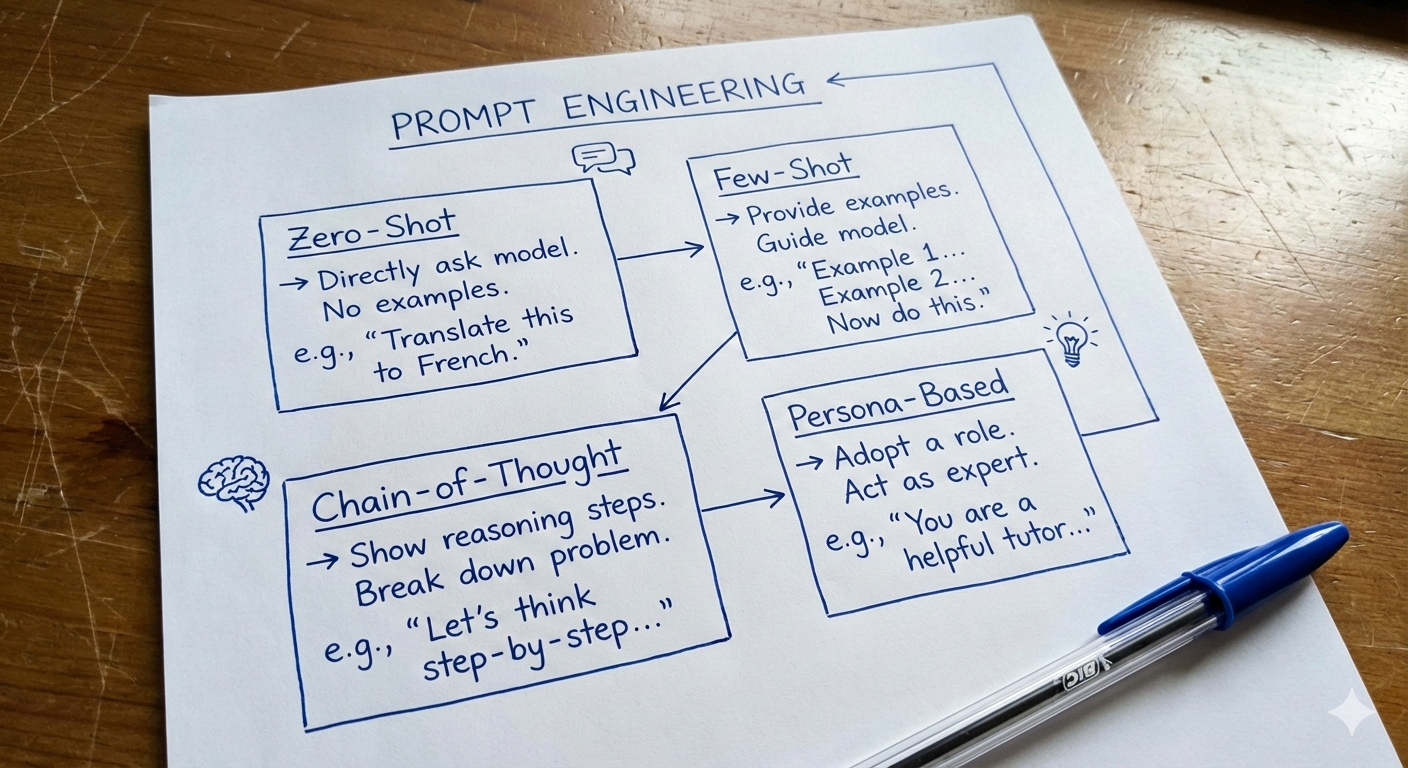
Let's get into the real techniques that actually work. I'll explain each one in two ways:
- How to use it in ChatGPT (for regular users)
- How to implement it in code (for developers)
1️⃣ Zero-Shot Prompting (The "Just Ask" Method)
This is when you ask the AI to do something without any examples.
You just throw a question or instruction at it and hope for the best.
🗣️ For ChatGPT Users:
Just type your question directly:
You are an alien from planet Kepler-22b who knows nothing about Earth.

What is the capital of India?
ChatGPT will respond as an alien who doesn't know Earth facts.
👨💻 For Developers:
Here's how I implement this in Python using OpenAI's API:
from openai import OpenAI

client = OpenAI()

response = client.chat.completions.create(
    model="gpt-4o-mini",
    messages=[
        {
            "role": "system",
            "content": "You are an alien from Kepler-22b. You don't know anything about Earth."
        },
        {
            "role": "user",
            "content": "What is the capital of India?"
        }
    ]
)

print(response.choices[0].message.content)
When to use it:
- Simple tasks
- General knowledge questions
- When you're testing if the AI already "gets it"
The problem? Zero-shot can be hit or miss. Sometimes it works perfectly. Other times, you get nonsense.
That's when you level up to...
2️⃣ Few-Shot Prompting (Show It Examples First)
Instead of just asking, you show the AI 2-3 examples of what you want, then let it handle the rest.
This is way more reliable than zero-shot.
🗣️ For ChatGPT Users:
Give examples in your prompt:
You are an alien from Kepler-22b. Here are some example conversations:

Example 1:
Human: What is the capital of India?
Alien: I am not sure about that as I am an alien from Kepler-22b.

Example 2:
Human: What is your home planet like?
Alien: Our home planet is beautiful with lush landscapes and vibrant ecosystems.

Example 3:
Human: Do you have spaceships?
Alien: Yes, we have advanced spacecraft that use warp technology.

Now answer this:
Human: How do you communicate with each other?
The AI learns from your examples and responds in the same style.
👨💻 For Developers:
from openai import OpenAI

client = OpenAI()

SYSTEM_PROMPT = """
You are an alien from Kepler-22b. Here are example responses:

User: What is the capital of India?
Alien: I am not sure about that as I am an alien from Kepler-22b.

User: What is your home planet like?
Alien: Our home planet is beautiful with lush landscapes and vibrant ecosystems.

User: Do you have spaceships?
Alien: Yes, we have advanced spacecraft that use warp technology.

Always respond as an alien. Output in JSON format:
{
    "Alien_Response": "your main response",
    "Additional_Info": "extra context if needed"
}
"""

response = client.chat.completions.create(
    model="gpt-4o-mini",
    messages=[
        {"role": "system", "content": SYSTEM_PROMPT},
        {"role": "user", "content": "How do you communicate?"}
    ]
)

print(response.choices[0].message.content)
When to use it:
- When you need consistent formatting
- When the task has a specific structure
- When zero-shot keeps failing
Real-world use case: I used this when building a customer support bot that needed to respond in a specific tone and format. Few-shot prompting made responses way more consistent.
3️⃣ Chain-of-Thought Prompting (Make It Think Step-by-Step)
This one's powerful.
Instead of asking for a final answer, you force the AI to think out loud before responding.
🗣️ For ChatGPT Users:
Just add "think step by step" to your prompt:
Solve this problem step by step:

If I have 15 apples and give away 40% to my friend, then buy 8 more apples, how many do I have?

Think through each step before giving the final answer.
ChatGPT will break down the problem:
- Calculate 40% of 15
- Subtract that from 15
- Add 8 to the result
- Give final answer
👨💻 For Developers:
Here's how I built an auto-reasoning system that thinks before answering:
from openai import OpenAI
import json

client = OpenAI()

SYSTEM_PROMPT = """
You work on START -> THINK -> ANSWER model.
Always think step by step before providing the final answer.

Rules:
1. Only run one step at a time
2. Output in JSON format

JSON Format:
{
    "Step": "START" or "THINK" or "ANSWER",
    "Output": "Your detailed thoughts here"
}
"""

message_history = [
    {"role": "system", "content": SYSTEM_PROMPT},
    {"role": "user", "content": "What is 15% of 240?"}
]

while True:
    response = client.chat.completions.create(
        model="gpt-4o-mini",
        response_format={"type": "json_object"},
        messages=message_history
    )

    result = json.loads(response.choices[0].message.content)
    message_history.append({"role": "assistant", "content": response.choices[0].message.content})

    if result.get("Step") == "START":
        print("💭", result.get("Output"))
    elif result.get("Step") == "THINK":
        print("🧠", result.get("Output"))
    elif result.get("Step") == "ANSWER":
        print("✅", result.get("Output"))
        break
This loops through START → THINK → ANSWER automatically.
When to use it:
- Complex reasoning tasks
- Math problems
- Multi-step instructions
- When you need to debug AI's logic
I use this all the time when building AI agents that need to make decisions. It's like giving the AI a mental checklist.
4️⃣ Persona-Based Prompting (Give It an Identity)
This is when you tell the AI to act like someone specific — a developer, a teacher, a pirate, whatever.
🗣️ For ChatGPT Users:
Start your conversation by defining who the AI should be:
You are Siddharth, a 24-year-old Full Stack Developer who loves hiking, technology, and coffee. You have a witty sense of humor and enjoy sharing interesting tech facts.

Now tell me: What do you like to do in your free time?
👨💻 For Developers:
from openai import OpenAI

client = OpenAI()

SYSTEM_PROMPT = """
You are Siddharth, a 24-year-old Full Stack Developer.
You love hiking, technology, and coffee.
You have a witty sense of humor and enjoy sharing interesting facts.
You specialize in React, Node.js, and Python.
"""

response = client.chat.completions.create(
    model="gpt-4o-mini",
    messages=[
        {"role": "system", "content": SYSTEM_PROMPT},
        {"role": "user", "content": "What do you do in your free time?"}
    ]
)

print(response.choices[0].message.content)
When to use it:
- Chatbots with personality
- Customer support bots
- Educational assistants
- Any AI that needs to "feel human"
Persona prompts make AI responses way more engaging. People connect better with AI that has a consistent voice.
📝 About That JSON Stuff (For Developers)
If you're not a developer, feel free to skip this section. It's technical implementation details.
For developers: You noticed I used JSON format in many examples. Here's why:
When building AI apps, you often need structured output — not just free text, but data you can parse and use in your code.
That's where JSON format shines:
response_format={"type": "json_object"}
This forces the AI to respond in valid JSON, which you can then:
- Parse with
json.loads() - Store in databases
- Pass to other functions
- Display in your UI
Without this, you'd be regex-parsing free text like a caveman.
🔧 Why ChatML Format Matters (For Developers)
Again, if you're just using ChatGPT directly, skip this section.
For developers building AI apps:
You've probably seen different ways to structure prompts:
- Alpaca format (used by some open-source models)
- LLaMA-2 format (Meta's style)
- ChatML format (OpenAI's standard)
ChatML is the one you should care about.
Here's why:
- It's the industry standard — OpenAI uses it, and most tools/libraries are built around it
- Clear role separation — System, User, Assistant messages are distinct
- Easy to debug — You can see exactly what's being sent to the model
- Works everywhere — Whether you're using GPT-4, Claude API, or local models with OpenAI-compatible wrappers
Here's what ChatML looks like:
messages = [
    {"role": "system", "content": "You are a helpful assistant."},
    {"role": "user", "content": "What is prompt engineering?"},
    {"role": "assistant", "content": "Prompt engineering is..."}
]
Simple. Clean. Standard.
This format makes it easy to:
- Build conversation history
- Switch between different AI models
- Debug what's being sent
- Maintain context across multiple turns
Unless you're working with a model that requires a different format, stick with ChatML. It'll save you headaches.
🛠️ My Real-World Experience: What to Use When
After building multiple AI products and experimenting with different prompting styles, here's what I've learned:
For quick tasks (both ChatGPT users and developers): → Use zero-shot. Just ask and move on.
For consistency (especially important for developers): → Use few-shot. Show 2-3 examples, let the AI follow the pattern.
For complex reasoning (both): → Use chain-of-thought. Add "think step-by-step" in ChatGPT, or build a reasoning loop in code.
For engaging interactions (both): → Use persona-based prompts. Give the AI a personality.
For building apps (developers): → Combine techniques. Use persona + few-shot. Or chain-of-thought + JSON output. → Always stick with ChatML format unless you have a damn good reason not to.
🎓 Your Next Steps
If you're a ChatGPT user: Start using these techniques in your daily conversations. Add examples to your prompts. Ask AI to think step-by-step. Define a persona at the start of your chat.
If you're a developer: Check out the code files I've shared above. Clone them. Run them. Break them. Modify them. Build something with them.
If you want to go deeper: Look into:
- Temperature settings (controls randomness)
- Token limits (how much text AI can process)
- Streaming responses (real-time output)
- Function calling (AI that can trigger your code)
🔥 Final Thoughts
Prompt engineering isn't magic. It's just clear communication with a tool that happens to be insanely powerful.
The better you get at it, the faster you work, the fewer frustrations you deal with, and the more you can actually build with AI.
I've been deep in this space lately — building with Python and JavaScript, exploring Generative AI, and learning how to make AI agents that actually work in production.
And honestly? This stuff is just getting started.
If you're curious, confused, or think I missed something important — hit me up.
I'm always learning, always building, always open to feedback.
You can reach me through the contact form here or any social media linked in the footer below.
Let's build something cool.
TL;DR:
- Prompt engineering = giving better instructions to AI
- Zero-shot: Just ask (works for simple stuff)
- Few-shot: Show examples first (for consistency)
- Chain-of-thought: Make it think step-by-step (for complex problems)
- Persona-based: Give it personality (for engaging interactions)
- For developers: Use ChatML format and JSON output for structured responses
- For everyone: Start with simple techniques, combine them as needed
Until we meet again, Keep learning. Keep shipping. Keep building.
Regards,
Siddharth, a tech guy building with AI on the web